
MaRS Schedule Manager – Revit Plugin
Take Control of Revit Data with Smart Excel Sync
Export. Edit. Validate. Sync back to Revit — in seconds.
Compatible with Autodesk Revit 2024 | Additional versions coming soon
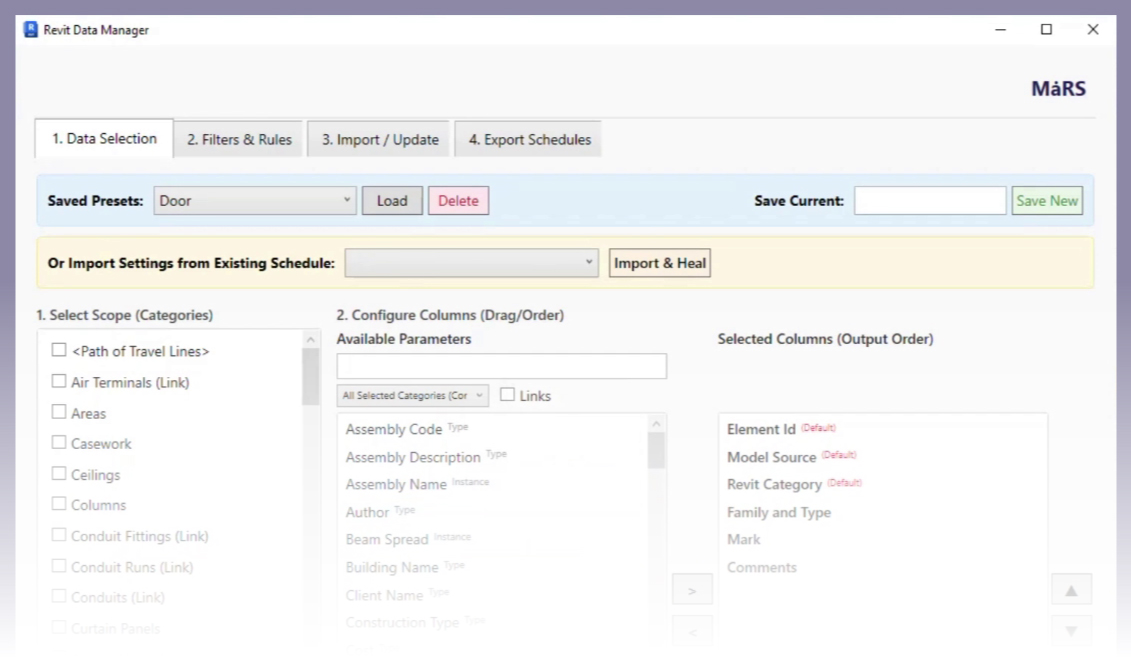
Meet MaRS Schedule Manager
Two-Way Excel Synchronization
Export model data to Excel. Perform bulk edits. Import back and update your Revit model instantly. No manual re-entry. No data loss.
Smart Presets
Save your category selections and parameter order as presets. Reload them anytime for consistent workflows across projects. Perfect for standardization.
Full Data Coverage
Export All Revit categories and elements, Schedules (quantities, material takeoffs, sheet logs), Family lists & project information, and Linked file data (read-only)

Built by BIM Professionals
MaRS Schedule Manager is developed by MaRS BIM Solutions, a team actively delivering BIM Services globally.
We built this tool based on real-world coordination challenges in medium to large-scale projects. It’s not just software. It’s experience-driven workflow optimization.
| Manual Process | With MaRS Schedule Manager |
|---|---|
| Create schedule manually | Structured export |
| Export inconsistently | Bulk Excel editing |
| Risk of errors | Built-in validation |
| No validation preview | Preset reusability |
| Reconfigure every time | Controlled updates |
MaRS Schedule Manager Revit Plugin built for



What You Gain
Save 5–10 hours per week on schedule management
Reduce human error
Standardize data workflows
Improve team coordination
Increase project delivery speed
Maintain clean and structured BIM data
FAQs
MaRS Schedule Manager is currently fully compatible with Autodesk Revit 2024.
We are actively developing and testing compatibility for additional versions, including Revit 2022, 2023, and 2025. These versions will be released in upcoming updates.
If you are using a different Revit version, you may contact our team to:
- Join the early access notification list
- Receive updates when your version becomes available
- Discuss enterprise compatibility requirements
We are committed to expanding support while maintaining performance and stability standards.
No changes are made automatically without your confirmation.
MaRS Schedule Manager includes a built-in validation preview before any data is synced back into your model. This allows you to review changes, detect potential errors, and maintain full control over what gets updated.
Your data integrity and model safety remain in your hands at all times.
Yes.
One of the core benefits of MaRS Schedule Manager is bulk parameter editing. After exporting to Excel, you can:
- Update hundreds or thousands of elements at once
- Modify parameters like Mark, Comments, Type Comments, or custom shared parameters
- Use Excel formulas for faster edits
- Apply standardized naming conventions instantly
Once edited, simply import the file back into Revit and validate changes before applying them.
Absolutely.
With Smart Presets, you can save:
- Selected categories
- Parameter order
- Configuration preferences
This allows you to maintain standardized workflows across multiple projects and teams.
It is particularly useful for BIM managers handling multiple models simultaneously.
Yes, linked file data can be exported for reference purposes.
However, linked model data is read-only to prevent unintended modifications. This ensures safe coordination workflows while still giving you visibility into external model data.
Download MaRS Schedule Manager Revit Plugin
350+ Happy Users
MaRS Schedule Manager completely changed how we handle Revit data. Bulk editing parameters in Excel and syncing back instantly has saved our team several hours every week. The validation feature gives us confidence before updating the model.
Michael R.
Senior BIM Coordinator
We manage large MEP coordination projects, and manual schedule updates were always a bottleneck. The preset feature alone is a huge time saver. Clean, simple, and powerful.
Amit Prajapati
General Manager, MEP
Earlier, one wrong paste could break multiple parameters. Now we export, bulk edit in Excel, preview, and sync safely. It’s structured and controlled — exactly how BIM workflows should be.
Darshan Desai
BIM Manager
Smart presets help us maintain consistent parameter order across multiple models and teams. It keeps our data organized and aligned with project standards.
Daniel T.
MEP Project Manager
The UI is clean, and the process is straightforward. From selecting categories to importing back into Revit — everything feels seamless.
Jonathan S.
BIM Manager
If your project involves frequent parameter updates or quantity schedules, this plugin is essential. It dramatically reduces repetitive work.
Anthony L.
Electrical BIM Lead